Javascript And The Dom

A frontend enthusiast passionate about crafting seamless user interfaces through clean, reusable code. My journey began in the realm of frontend development, where I honed my skills in building responsive and engaging experiences for users.
Driven by an insatiable curiosity and a love for learning, I'm currently expanding my expertise to include backend development. Embracing this transition, I'm diving into the world of backend technologies like Java, seeking to enrich my toolkit and create more comprehensive solutions.
JavaScript, also known as ECMAScript, is a scripting or programming language that allows you to add complex features to web pages such as dynamically updating content, controlling multimedia, animating images, and much more. Along with HTML and CSS, it is one of the most important web technologies. JavaScript can be found in client-side web applications, server-side web applications, mobile applications, desktop applications, and web games. Although there is some confusion between JavaScript and Java, the two have very little in common. Java programs must first be compiled into an executable format before they can be executed. JavaScript, on the other hand, was designed to be interpreted at runtime, making it much more useful.
There are several features of JavaScript such as
Object-Oriented Programming Support; JavaScript supports Object-Oriented Programming by allowing inheritance through prototyping as well as properties and methods.
Dynamic Typing; this means variable types are specified based on the stored value. For instance, if you declare a variable x, you can store a string, a Number type value, an array, or an object.
Platform-Independent; JavaScript is portable, which means you can write the script once and run it anywhere and at any time. In general, you can create JavaScript applications and run them on any platform or browser without affecting the script's performance.
Functional Style; JavaScript takes a functional approach, using prototypes rather than classes or inheritance.
Interpreted Language; JavaScript is an interpreted language, the script written within javascript is processed line by line.
Async Processing; JavaScript supports Promise, which allows asynchronous requests in which a request is initiated but JavaScript does not have to wait for the response, which can sometimes stall request processing. A good example is the fetch() API, which is basically like a modern, more efficient version of XMLHttpRequest.
Client-side Validation; Client-side validations are available in JavaScript. This is a feature that has been available in JavaScript for a long time and is still commonly used because every website has a form in which users enter values, and to ensure that users enter the correct value, proper validations must be implemented on both the client-side and the server-side.
Event Handling; JavaScript can control operations updated on servers. This is essentially controlling the response on the website when the user attempts to perform any operation handled by the server by the client, such as clicking on links and options, contact response over the website, and so on.
Prototype-based scripting Language; This means javascript uses prototypes instead of classes or inheritance.
The latest ECMAScript standard defines nine types of data which can be categorized into
Primitive: The primitive data types include Number, String, BigInt, Undefined, Boolean, and Symbol.
Structural type: The structural data type includes Objects, Function.
Structural Root Primitive: The structural root primitive data type is Null.
I would briefly discuss some of the data types below;
NUMBER
The Number data type represents both integer and floating-point numbers. There are many operations for numbers, e.g. multiplication * , division / , addition + , subtraction - , and so on.

The number data type also includes special numeric values such as infinity and NaN(Not a number). Infinity is represented by ∞. It is a special value that is greater than any number.

On the other hand, NaN represents a computational error. It is a result of an incorrect or an undefined mathematical operation.
STRING
The String data type represents a value that is surrounded by quotes, either single or double-quotes. Strings may be used to store data that can be interpreted as text.

Some of the most common string operations are length checking, building and concatenating strings with the + and += string operators, checking for the existence or location of substrings with the indexOf() method, and extracting substrings with the substring() method.
OBJECT
The Object data type is used to store keyed collections of different types of data as well as more complex entities. In JavaScript, objects penetrate nearly every aspect of the language. An object can be created with {...} with an optional list of properties.

A property is a “key: value” pair, where the key is a string (also known as the “property name”) and the value may be anything.
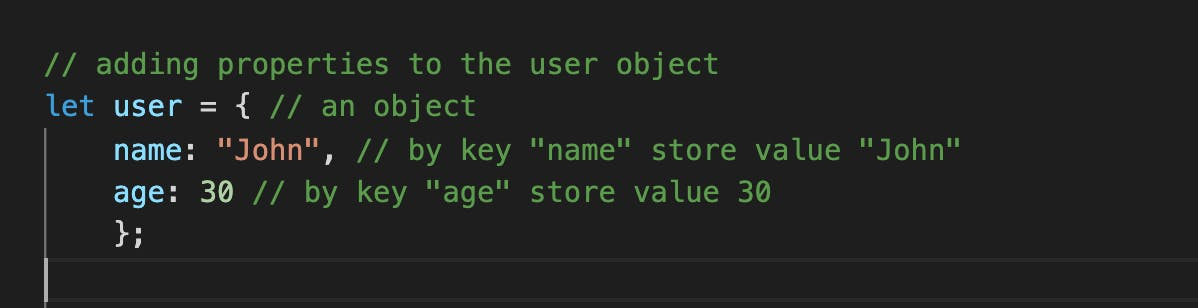
We can add, remove and read files from it at any time. Property values are accessible using the dot (.) or square bracket [ ] notation.
The DOM (or Document Object Model) is an object created by the browser. JavaScript and the DOM were once tightly intertwined, however, they gradually became distinct entities. The DOM is an application programming interface (API) for HTML and XML documents. The DOM is a tree-like representation of the contents of a webpage - a tree of nodes(HTML elements) with different relationships depending on how they are arranged in the HTML document. It connects web pages to scripts or programming languages by representing the structure of a document—such as the HTML representing a web page—in memory. The elements of an HTML document can be accessed and changed by JavaScript with the DOM.
The Document Object Model currently consists of two parts, DOM Core, and DOM HTML. The DOM Core represents the functionality used for XML documents, and also serves as the basis for DOM HTML.

source: learningactors.com/what-exactly-is-the-dom
The DOM represents an HTML or XML document as a hierarchy of nodes.
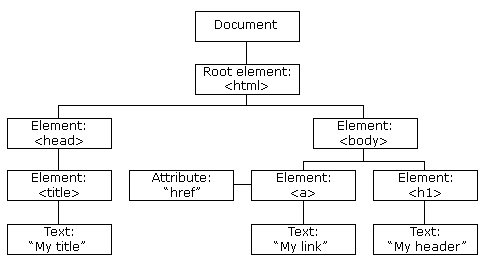
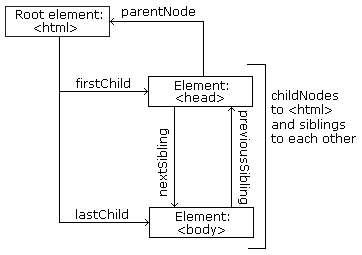
source:w3schools.com/js/js_htmldom_navigation.asp
The following node properties can be used to navigate between nodes with JavaScript: parentNode, childNodes[nodenumber], firstChild, lastChild, nextSibling, and previousSibling.
All HTML elements are defined as objects in the DOM. Each object's properties and methods make up the programming interface. A property is a value that can be accessed or changed. For instance, changing the content of an HTML element. A method is an action that can be carried out. For instance, adding or deleting an HTML element.
The DOM gives JavaScript the ability to create dynamic and interactive HTML such as; the ability to alter all HTML elements on a web page, modify any of the HTML attributes on a web page, change any of the page's CSS style, remove existing HTML elements, and attributes, create new HTML elements, and attributes, react to all HTML events in the page as well as add new HTML events to a page.
Examples of methods and property which can be used to access and manipulate HTML;
Method
- document.getElementById(id): Finds an element by element id
<body>
<div id = "myDiv"></div>

<script>

let myElem = document.getElementById('myDiv');
</script>

</body>
- document.getElementsByTagName(name): Finds an element by element tag name
<body>
<div></div>

<script>

let myElem = document.getElementsByTagName('div');
</script>

</body>
- document.getElementsByClassName(name): Finds an element by element class name
<body>
<div class="classDiv"></div>

<script>

let myElem = document.getElementsByClassName('classDiv');
</script>

</body>
- element.setAttribute(attribute, value): Changes the attribute value of an HTML element
<body>

<div>
<a href="#" class="attr"></a>
</div

<script>

let myElem = document.getElementsByClassName('attr');
myElem.setAttribute("href", "www.https://www.w3schools.com");
</script>

</body>
- document.createElement(element): Creates an HTML element
<body>
<div class="classDiv"></div>

<script>

let myElem = document.createElement('p');

</script>

</body>
- document.removeChild(element): Removes an HTML element
<body>
<ul class="ulclass">
<li> one</li>
<li> two </li>
</ul>

<script>

let myElem = document.getElementByClassName('ulclass');
// remove first child (<li> one </li>)
myElem.removeChild(myElem.childNodes[0])

</script>

</body>
Property
- element.innerHTML = new html content: Changes the innerHTML value of an HTML element
<body>
<div id = "myDiv">
<p id = "paragraph">Hi there!</p>
</div>

<script>

let myElem = document.getElementById('paragraph');

myElem.innerHTML = "Hello World!";
// returns <p id = "paragraph">Hello World!</p>

</script>

</body>
- element.style.property = new style: Changes the style of an HTML element
<body>
<div id = "myDiv">
<p id = "paragraph">Hi there!</p>
</div>

<script>

let myElem = document.getElementById('paragraph');

myElem.style.color = "red";
// changes the text colour of p element to red

</script>

</body>
The HTML DOM allows JavaScript to react to HTML events. Action in the web browser is referred to as an event. Each event can have an event handler, which is a code block that runs when the event happens. The term event handler is often used to refer to an event listener. It waits for the event and takes action when it happens.
- Assuming there is a button with an id of btn;
<button id = "btn"> Click Me </button>
- First, the button with an id of btn is selected using the getElementById method, then a function display() is defined as an event handler.
let myBtn = document.getElementById('btn');

function display() {
    alert('I have been clicked!');
}

myBtn.addEventListener('click', display);
- When a user interacts with the button by clicking it, the display() function is triggered. Other events include submit, input, change, keyup etc.
In conclusion, JavaScript's ability to control the DOM is one of its most useful features. The DOM is not a programming language, but without it, the JavaScript language would not have any model or notion of web pages, HTML documents, XML documents, and their component parts (e.g. elements).
REFERENCES
Javascript tutorial. (n.d.). JavaScript Events. Retrieved April Tuesday, 20th, 2021, from javascripttutorial.net/javascript-dom/javas..
Haverbeke, M. (2018). Eloquent Javascript (Third Edition ed.). No Starch Press. amazon.com/dp/1593279507/?tag=marijhaver-20
Kantor, I. (2019). The Javascript language. javascript.info
McFarland, D. S. (2014, september). JavaScript & jQuery: The Missing Manual. O'Reilly. Retrieved April 20, 2021, from oreilly.com/library/view/javascript-jquery/..
MDN WEB DOCS. (n.d.). JavaScript data types and data structures. MDN WEB DOCS. Retrieved April 20, 2021, from developer.mozilla.org/en-US/docs/Web/JavaSc..
MDN WEB DOCS. (n.d.). JavaScript data types and data structures. MDN WEB DOCS. Retrieved April 20, 2021, from developer.mozilla.org/en-US/docs/Web/API/Do..
The Odin Project. (n.d.). DOM Manipulation. DOM Manipulation - The odin project. Retrieved April 20, 2021, from theodinproject.com/paths/foundations/course..
Pamela. (n.d.). DOM event types. Khan Academy. Retrieved April 21, 2021, from khanacademy.org/computing/computer-programm..
Pedamkar, P. (n.d.). Introduction to javascript. Introduction to javascript. Retrieved April 20, 2021, from educba.com/introduction-to-javascript/?sour..
study tonight. (n.d.). Include JavaScript in HTML. Javascript Features- Studytonight. Retrieved April 20, 2021, from studytonight.com/javascript/javascript-feat..
w3schools. (n.d.). HTML DOM. w3schools. Retrieved April 20th, 2021, from w3schools.com/js/js_htmldom.asp